Basic practice
FREE
No child name or account needed
- Ten-word curriculum practice
- Hear each word in a sentence
- Clear correction and another try
Fictional interactive teacher demo
Choose one pupil or a group. Select curriculum words from school teaching, such as necessary, or add your own. Check the pupils and words, then send. Pupils already sent a list this week cannot be selected again. Previously used words stay reusable for another group.
One class, flexible groups. Send the same spelling list to several pupils. Choose a smaller list for a pupil or group where it helps.
Words stay reusable. See which words you have already used this week. You can choose them again for another group that needs them.
Teacher approves every list. Spellito helps you prepare the list. You remain responsible for checking the final pupils and words before sending.
One checked digital list can replace printing, cutting and sticking separate spelling slips for each pupil. Keep writing on paper and other hands-on activities where they help. Preparation time depends on the words and checks involved.
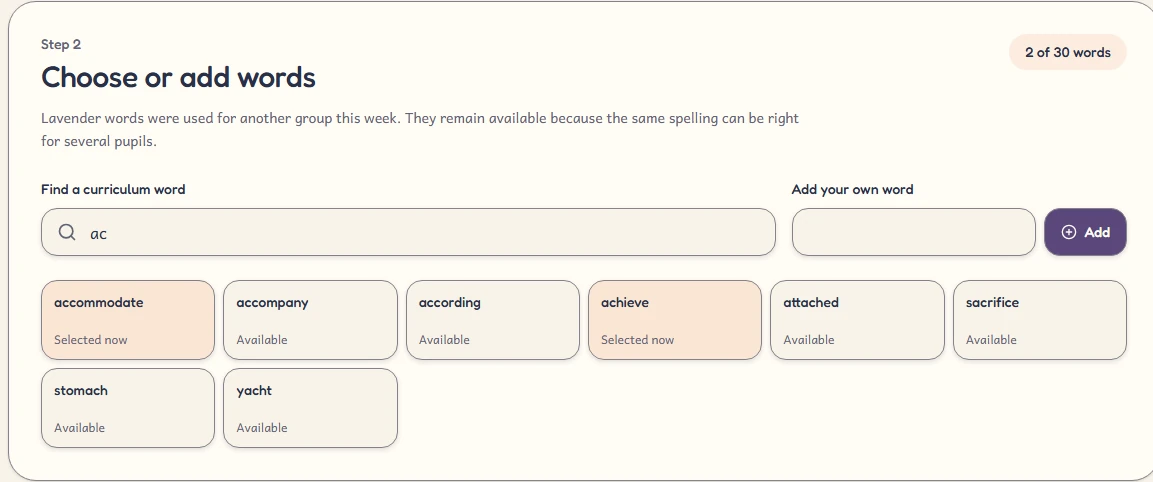
Try choosing pupils and words in the preview below. In your class workspace, you can also check the sentences and listen to the words before sending real work.
Try it yourself
You can use the controls below to try the steps with made-up pupils. This preview sends nothing to a real child. Refreshing the page resets it.
Questions teachers ask
Yes. You can choose one pupil, a small group or all eligible confirmed pupils. Check who can receive the work, then review the pupils and words before sending anything.
Yes. Spellito marks a word that has already been used that week. You can still choose it for another group or individual pupil who needs it.
No. Spellito does not let AI (artificial intelligence) assign work directly to children. For example, any future suggestion tool would need a teacher to check and approve its words before sending. The teacher would stay in control.
No. Every pupil name, status and selection on this public page is made up for the demo. It sends nothing and stores no pupil information.
Clear annual pricing
Children can keep using basic ten-word practice without a payment. A teacher can create the free class identity first, then add a class or whole-school licence when the time-saving tools are useful.
Basic practice
FREE
No child name or account needed
One class
£49
per class per year
12 months. No automatic renewal.
Whole school
£1
per pupil per year · £99 minimum
12 months. No automatic renewal.
iPhone and iPad
Beta available now
Sign up
Android
Available now
Download
Windows
Available now
Download
Phone, tablet and computer
Available now
Install guide